How SubLien works: four document workflows, one vendor record
Quick answer
SubLien collects lien waivers, COIs, W-9 source files and signed vendor documents on one record per subcontractor. Your vendors respond through secure emailed links without creating accounts. Start standalone; Procore or QuickBooks Online is optional, one provider at a time.
Start with the document you need
These are product workflow examples, not customer results or a promise about time saved. Each document keeps its own request, signing or review steps.
1. Prepare, send and track a lien waiver
- Prepare. Choose the vendor, project, amount and waiver type. Use your own prepared PDF or the optional SubLien library after an owner/admin chooses to use it.
- Send. The vendor receives a secure emailed request. Electronic signing includes email verification and a recorded authority answer. Where the selected route requires uploaded execution, the vendor returns the signed document instead.
- Track. See outstanding requests and reminders, then retrieve the completed PDF and available signing evidence from the waiver record.
The SubLien library covers all 50 states and DC. Georgia, Mississippi and Wyoming library forms use uploaded execution. Your organization chooses the form and whether it fits the transaction; signing records do not establish identity, authority or enforceability. SubLien does not process or release payment.
See lien waiver software · Find your state's reference and free forms
2. Review a COI with the source beside the fields
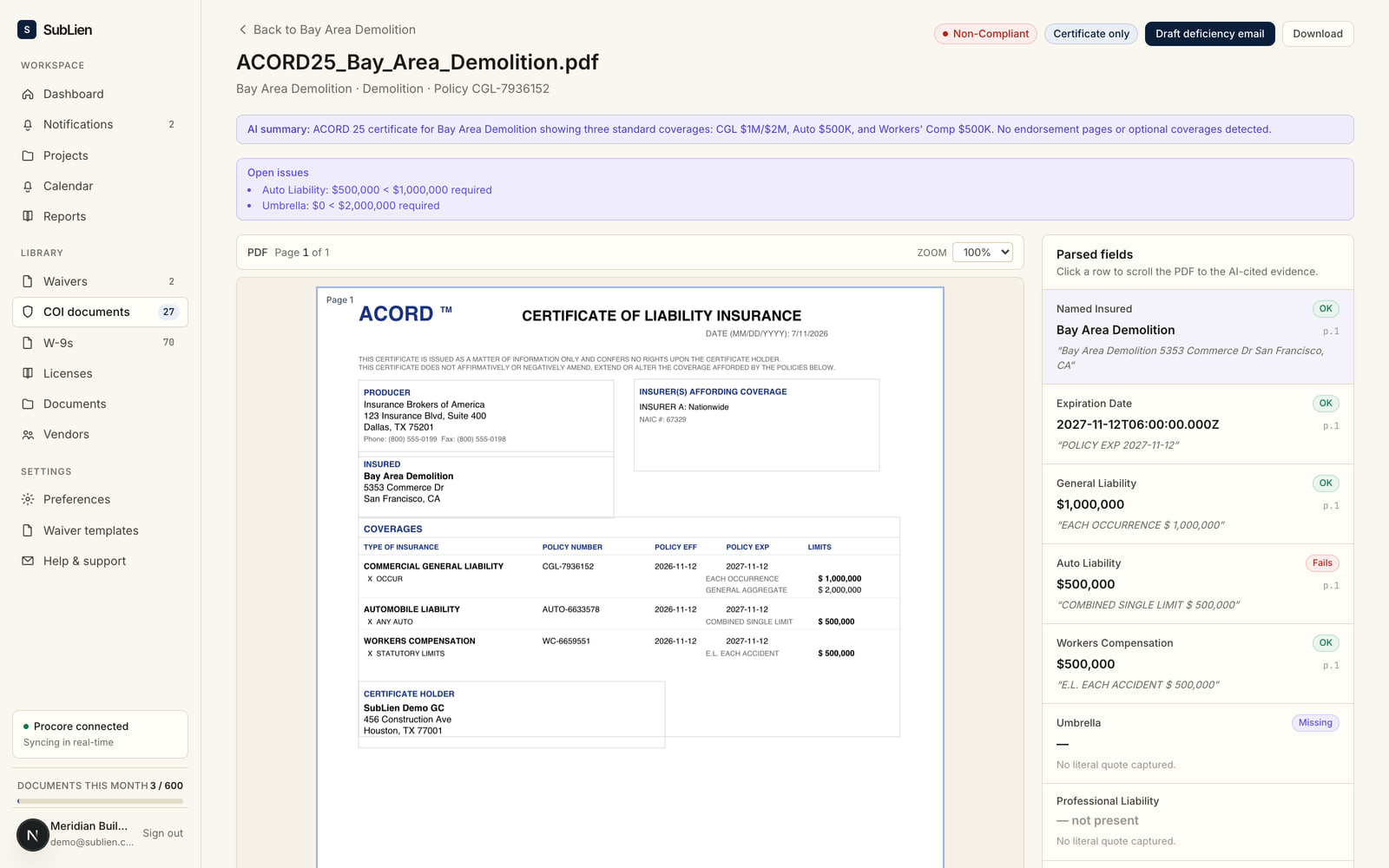
- Collect. Request a certificate from the vendor or their insurance agent, or upload the file your team already has.
- Check the prefill. AI reads the ACORD 25 and prefills recorded limits and coverage dates, with source references. Compare them with your configured company, project or vendor requirements.
- Record your review. Your reviewer checks and changes the values as needed, then records the decision. Track expirations and configured renewal reminders from the recorded dates.
For example, if the certificate records a $1 million limit and your configured minimum is $2 million, the comparison shows that difference. It does not decide whether coverage applies. Policies and endorsements control; your team decides what further documents or action it needs.
3. Collect the W-9 source file
- Request. Send the vendor a secure link to upload their W-9.
- Keep the source. Retain the uploaded file on the vendor record, alongside the other document workflows.
- Use your own review process. Your team handles tax review and any corrections. SubLien does not read or extract W-9 fields, validate tax identifiers or file tax forms.
4. Send an agreement for vendor and GC signatures
- Prepare your PDF. Upload the subcontract agreement, place fields, and choose vendor signing or vendor-then-GC signing. You can save a reusable template; sent requests keep their own frozen copy.
- Vendor signs first. The vendor opens the emailed link, confirms their email and completes the required fields and signature.
- Your assigned signer countersigns. When requested, the assigned owner/admin signs next. The completed file includes a signature record page and remains on the vendor document record.
A document requiring notarization follows a different route: download, sign before a notary, upload and GC review. No electronic signature is collected on that route. Vendor documents remain separate from lien-waiver, COI and W-9 workflows.
Every workflow is included
From $199/month or $1,990/year for up to 50 active vendors, with unlimited users and projects. All published tiers include the four workflows. Annual billing gives two months free. Published tiers run up to 500 vendors; above 500, pricing is custom.
See the full pricing table · Compare COI software · Compare lien waiver software
Bring the documents you chase today.
Book a demo to walk through your waiver, certificate, W-9 and agreement process with SubLien.