Signed from an email link
Conditional and unconditional waivers on your own forms or the state library, with reminders until each one is back and a signature certificate on every signed PDF.
Lien waiver softwarebcs’s free plan covers certificates of insurance for up to 25 vendors, its Self-Service plan is $0.95 per vendor a month, and its site doesn’t list lien waivers. SubLien tracks COIs too: subs upload from an emailed link with no account, the AI checks every coverage line against your minimums, reminders go out before each policy expires, and a named person on your team records the decision, from $199 a month for up to 25 active vendors. The same plan also collects each sub’s lien waivers, W-9 and signed agreements, so one vendor record holds everything you need before you pay.
| bcs | SubLien | |
|---|---|---|
| Price | Free plan (“COI Tracking Software only”) for up to 25 vendors; Self-Service $0.95 per vendor a month; Full-Service $17.80 per vendor a year with a $10,000 yearly minimum | $199/month or $1,990/year for up to 25 active vendors, every feature included |
| Lien waivers | Not listed on its site | Unlimited, on your forms or the state library, signed from an email link |
| COI review | AI review on every plan; professional review on Full-Service | AI checks every coverage line; your reviewer decides |
| Unlimited users | Self-Service and Full-Service; not listed on the free plan | Every plan |
| Procore integration | Self-Service and Full-Service; $2 per vendor a year per its FAQ | Procore or QuickBooks Online, every plan |
A certificate summarizes coverage; your team decides what it means for the job. SubLien reads it, checks it, and records who decided.
AI reads the ACORD 25 row by row and checks each limit, endorsement box and date against your company, project and vendor minimums, beside the spot it read each value from.
General liability can run to 2027 while the umbrella ends next month. Reminders follow the first line to run out, and can copy the insurance agent.
“Is the owner an additional insured?” The answer quotes the certificate, so your reviewer can check it in one look.
Who approved what, and when, stays on the vendor record and in the audit log.
See the COI workflow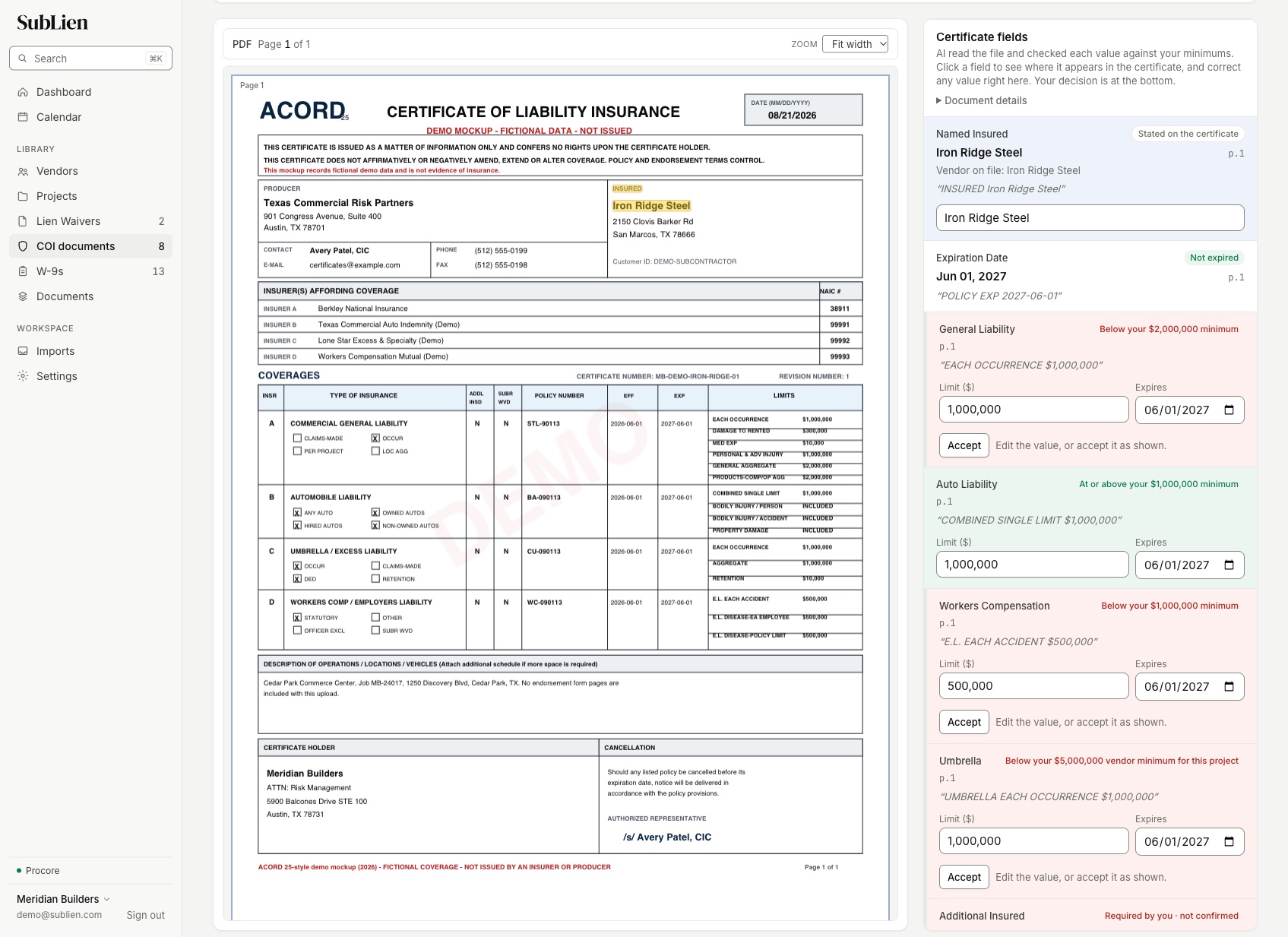
Conditional and unconditional waivers on your own forms or the state library, with reminders until each one is back and a signature certificate on every signed PDF.
Lien waiver softwareSubs upload the form from a secure link and reminders follow up. SubLien keeps the file as sent and never sends it to AI.
W-9 collectionSend a subcontract for the sub’s signature and your countersignature, or request a license with its expiration date and get a renewal request before it lapses.
Vendor documentsExport your current certificates from bcs and keep them with your project files.
Import the subs you work with now from a spreadsheet, Procore or QuickBooks Online. Only active vendors count toward your plan.
Set your insurance minimums once: a company default, then any project or vendor that needs more.
Request current certificates; each sub or its agent uploads from a secure link.
Send the next draw’s lien waivers from the same vendor records.
Bring an ACORD 25 from a current sub. We’ll show the AI checking each coverage line against your minimums and the review your team records.