TrustLayer alternatives for COI tracking
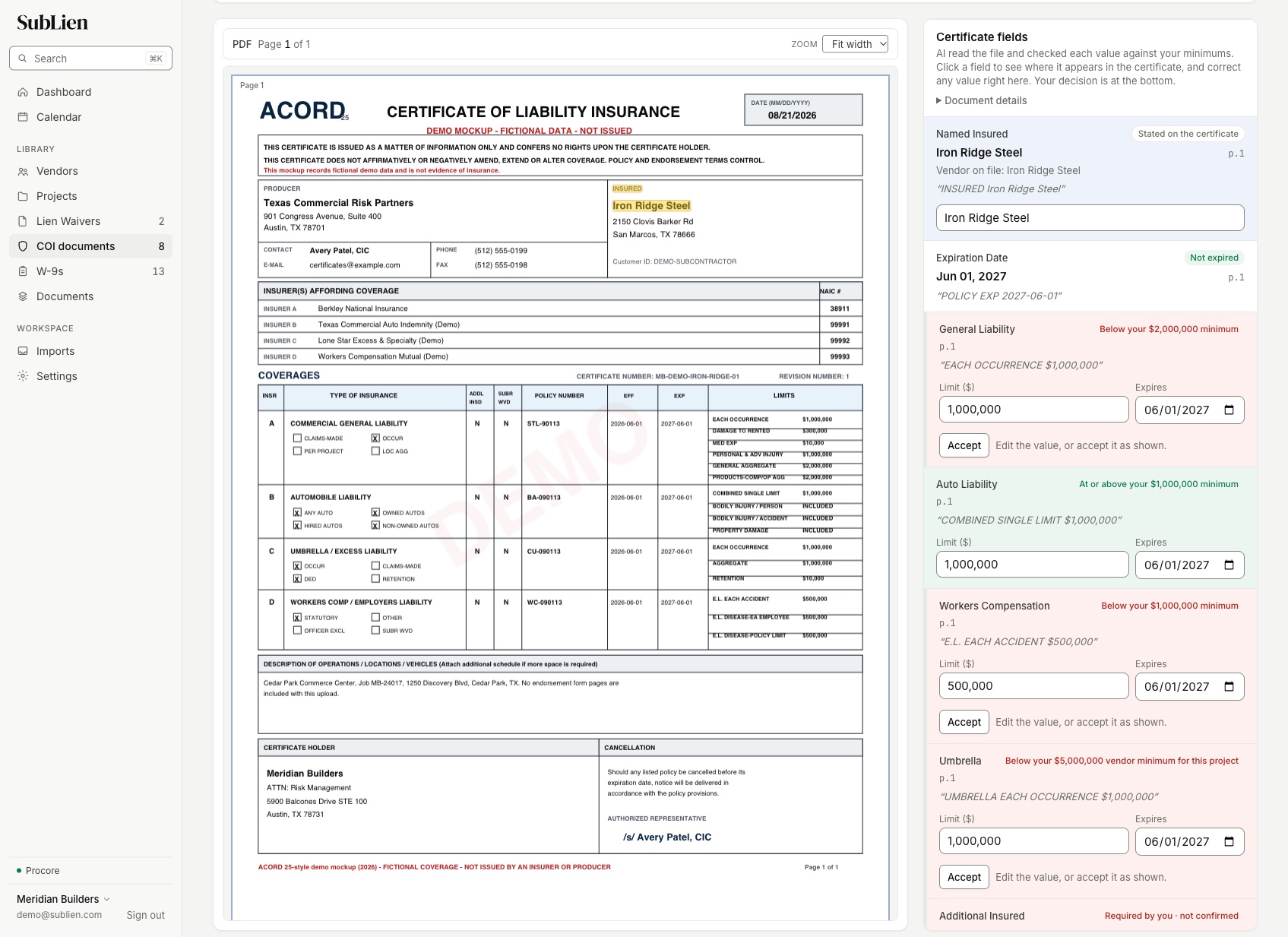
TrustLayer’s free Starter plan covers 50 vendors and charges $10 for each additional vendor a month, and its AI there checks that a document is present; checking certificates against your requirements is on Pro, whose price isn’t published. SubLien’s AI checks every coverage line against your minimums on every plan, from $199 a month for up to 25 active vendors. The same plan also collects each sub’s lien waivers, W-9 and signed agreements, so one vendor record holds everything you need before you pay.
What each vendor count costs
| Active vendors | TrustLayer Starter | SubLien |
|---|---|---|
| 50 | Free | $299/month, every feature included |
| 100 | $500/month | $399/month, every feature included |
| 150 | $1,000/month | $499/month, every feature included |
| 200 | $1,500/month | $599/month, every feature included |
| 250 | $2,000/month | $699/month, every feature included |
| 300 | $2,500/month | $799/month, every feature included |
What Starter leaves for Pro
| TrustLayer Starter (free) | SubLien, every plan | |
|---|---|---|
| Checks against your requirements | On Pro (“AI Smart Requirements”); Starter’s AI checks that a document is present | AI checks every coverage line against your minimums |
| W-9s | W-9 extraction on Pro | Requested by link, tracked and stored as sent |
| Procore integration | On Pro | Procore or QuickBooks Online |
| Unlimited users | On Complete | Included |
| Published price | Starter only; Pro and Complete by quote | Every step, 50 to 500 vendors and above |
Checked against your minimums, decided by your team
The certificate is read line by line, each value is shown where it sits on the ACORD 25, and the decision is recorded with a name on it.
Three levels of minimums
A company default, project minimums and vendor minimums. The highest limit and every required endorsement apply.
One date per coverage line
Each line keeps its own expiry, and renewal reminders follow the first one to run out.
Questions answered from the certificate
Ask whether the owner is an additional insured; the answer quotes the certificate it came from.
Lien waivers and W-9s on the same record
The sub’s waivers, W-9 and agreements sit beside the certificate, so the person approving a payment sees all of it.
Moving your COIs off TrustLayer
Export your current certificates from TrustLayer and keep them with your project files.
Recreate your insurance requirements as a company default, then the projects and vendors that need more.
Import the subs you work with now from a spreadsheet, Procore or QuickBooks Online. Only active vendors count toward your plan.
Request current certificates; each sub or its agent uploads from a secure link.
Questions GCs ask when leaving TrustLayer
How much does TrustLayer cost?
Does TrustLayer's free plan check certificates against my requirements?
Does SubLien have a free plan?
Can I bring my existing insurance requirements?
Do my subs or their agents need an account?
Watch SubLien check one of your own COIs.
Bring an ACORD 25 from a current sub. We’ll show the AI checking each coverage line against your minimums and the review your team records.