Sending lien waivers in DocuSign? Auto-draft waivers, COIs and W-9s from $199/mo.
SubLien starts at $199/month for up to 25 active vendors. Subs e-sign lien waivers from an email link, and the same plan covers COIs checked by AI, W-9s and any vendor document, with a page for every vendor and project.
SubLien
$199
- Unlimited auto-drafted lien waivers
- Unlimited COI reviews with AI checks
- W-9 collection
- Vendor documents and e‑signature
- Unlimited users and projects
- Free white-glove onboarding
One plan for every document you collect from subs.
DocuSign signs one PDF at a time, leaving your team to prep forms and track waivers, COIs, and W-9s in spreadsheets. SubLien puts every sub’s paperwork on one vendor record with unlimited e-signatures.
- General liability$2,000,000
- Auto liability$1,000,000
- Umbrella$2,000,000
- SentConditional partial · Pay app #5
- SignedConditional partial · Pay app #3
- SignedUnconditional partial · Pay app #2
- SignedConditional partial · Pay app #2
- Contractor license
- Payment bond
- Master subcontract agreement
- Needs GC signatureChange order #3
- Waiting for vendorSite safety plan
- COIs: AI checks each coverage line against your minimums, each line keeps its own expiry date, and your reviewer decides.
- Lien waivers: Drafted from your Procore pay app, QuickBooks bill or AP export, e-signed from a link, with up to three reminders.
- W-9: Stored as uploaded and never read or sent to AI, then reviewed by a named person on your team.
- Documents: Licenses, bonds and contracts with their expiry dates; SubLien asks the sub for the renewed copy before a dated one expires.
And a page for every project.
Each sub’s status on the job, the same in the Procore side panel when Procore is connected.
On DocuSign’s public pages, checked November 26, 2026
Listed
- General-purpose electronic signature envelopes and templates
- Automatic signing reminders on sent envelopes
Costs it lists
- Priced per user seat with envelope limits on standard plans
Not listed on its site
- Auto-drafted lien waivers from invoices or bills
- AI checks of COIs against GC minimums
- Subcontractor W-9 tracking on a vendor record
- Project and vendor compliance dashboards
Watch SubLien in 2 minutes.
See a real lien waiver, AI COI check, project compliance view, and expiration calendar—no signup required.
Lien waivers drafted for you, e-signed from a link and chased on a schedule.
Stop manually preparing PDFs and chasing envelopes one by one. SubLien auto-drafts waivers from your Procore pay apps, QuickBooks Online bills, or spreadsheet export, and your sub signs from an emailed link with no account.
- No sub login. Subs sign from an emailed link, with no account and nothing to install.
- Up to three automatic reminders. On days 3, 7 and 12 after sending, or days 7, 14 and 21 on the weekly schedule, and they stop when the waiver comes back.
- Your forms or ours. Upload the lien-waiver PDFs you use today, or use SubLien’s: it presents the template recorded for the project’s state.
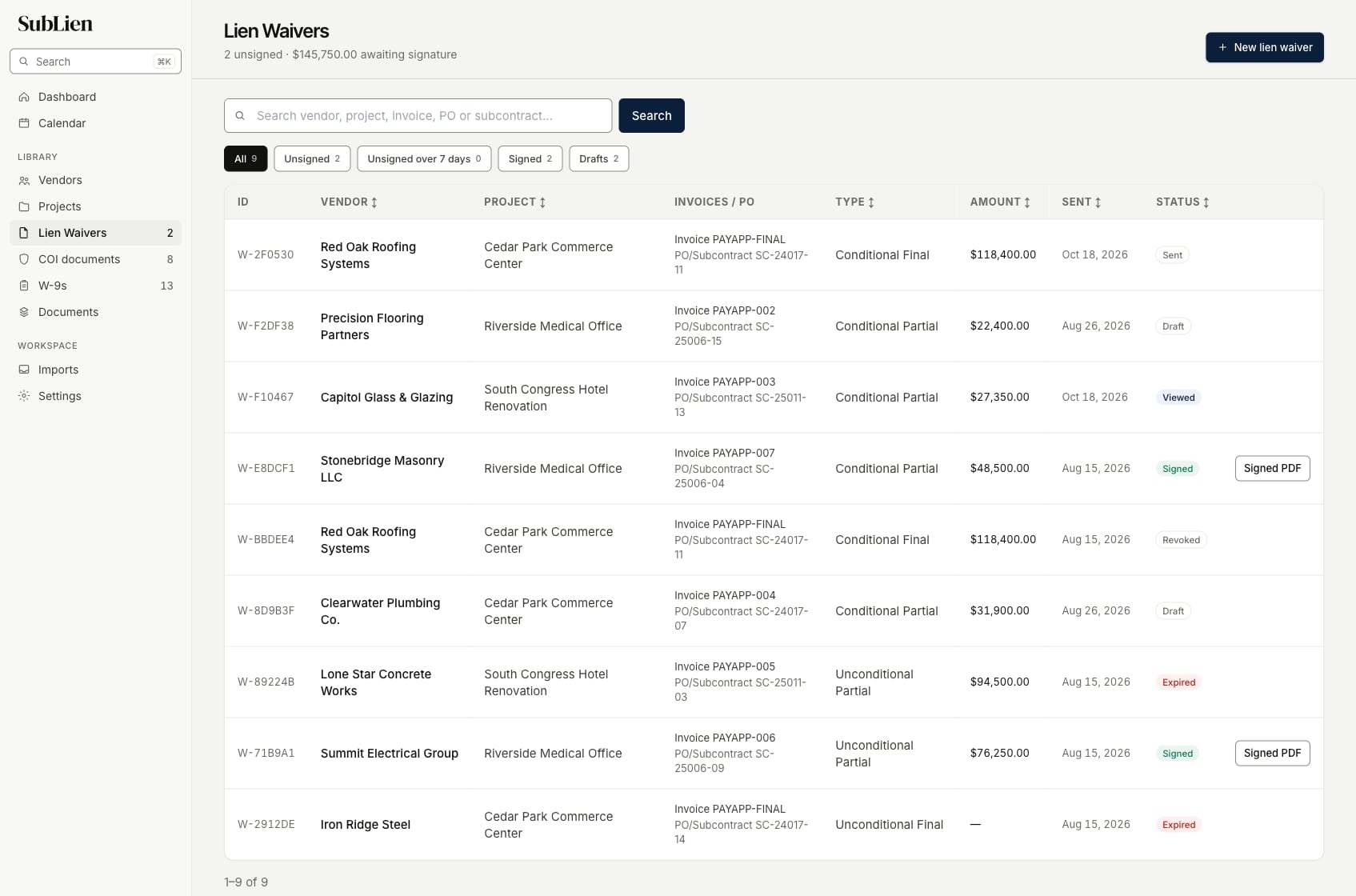
Lien Waivers
Red Oak Roofing Systems
$118,400.00SentCapitol Glass & Glazing
$27,350.00ViewedStonebridge Masonry LLC
$48,500.00SignedLone Star Concrete Works
$94,500.00ExpiredPrecision Flooring Partners
$22,400.00
Switch from DocuSign with free white-glove onboarding.
We set up your lien-waiver and document templates, import your vendors, projects and existing documents, and configure your workspace with you, free.
We set up your waiver forms
The lien-waiver PDFs you use today, with their fields placed, or SubLien’s form for each project’s state.
We import your subs and projects
From a spreadsheet, Procore or QuickBooks Online, with an email address for each sub.
You send the next draw’s waivers
By hand, or drafted from a Procore pay app or QuickBooks bill. Up to three automatic reminders take it from there.
SubLien and DocuSign, side by side.
| What you get | SubLienFrom $199/mo, everything included | DocuSign |
|---|---|---|
| Auto-drafted lien waivers | Unlimited, every plan | |
| First-party e-signature for subs | Unlimited e-signatures included | Listed |
| COIs checked against your minimums | Included | |
| W-9 collection on each vendor record | Included | |
| Project and vendor compliance dashboards | Included | |
| Team seats and projects | Unlimited users and projects | Priced per user seat with envelope limits on standard plans |
See SubLien run, and confirm your plan for your vendor count.
“Time-Saving Compliance Doc Tracking with SubLien”
“The features on SubLien are exactly what we’ve been looking for to track compliance docs. The interface is very intuitive and user friendly - onboarding was quick and easy! Using Sublien is already saving us so much time.”
- Lien waiver tracking“helps us remind subs and quickly follow up, import functionality saves us so much time generating waivers”
- COI compliance“easily scans certificates and flags gaps, saves us time in reviewing certs”
- Dashboard“easily gives us data on what is outstanding per sub per job!”
What she dislikes: “Haven’t run into anything yet - all positives for us!”
What GCs ask when leaving DocuSign.
Why do general contractors switch from DocuSign to SubLien for lien waivers?
What does SubLien cost compared with paying per seat and per envelope?
Can I keep the exact lien waiver PDFs I send in DocuSign today?
Can SubLien also handle subcontracts and other documents we send through DocuSign?
Do my subcontractors need a SubLien account to sign?
Who sets SubLien up when we move off DocuSign?
Can I get a refund?
See a lien waiver go out and come back signed.
We use sample records, or bring one of your own documents.
- From $199/mo for up to 25 active vendors
- Free white-glove onboarding
- Pay monthly, or yearly with two months free